Identify Any Coin
by Photo
Place a coin on a flat surface and take one picture. CoinBrain comes back with the country, denomination, year and mint mark — plus composition, weight, diameter and the catalogue number — and it is ready to save into your album.
From pocket change to antiquity
Browse the catalogue by type, or just scan whatever is in front of you — the app works out which bucket a coin belongs to from its country and year.
Three steps, one coin at a time
No loupe, no catalogue, no guessing at a worn date. Put the coin down and take the picture.
Photograph the coin
Place it on a flat, well-lit surface and fit it inside the circle. Shoot the obverse, the reverse or the edge — whichever side tells the story.
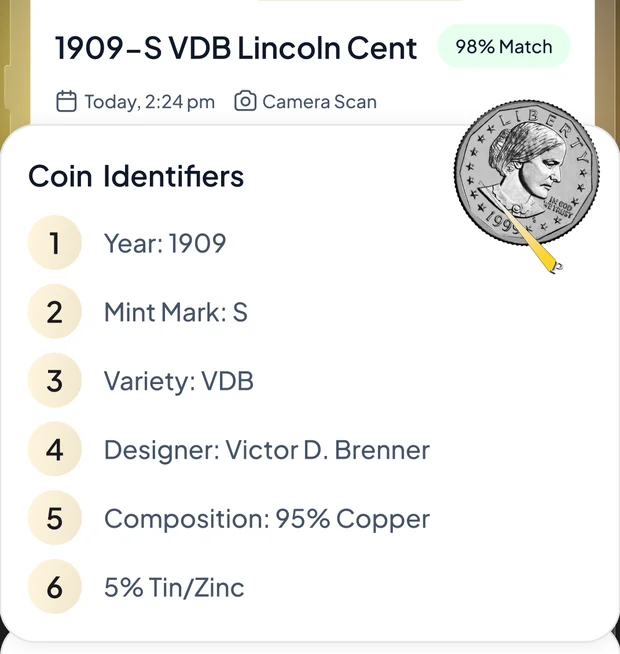
Read the identifiers
Country, denomination, year, mint mark, designer, composition, weight, diameter, edge and catalogue number — whichever can be read, with a match confidence beside them.
File it in an album
Save it to an album and the coin joins your collection total, with its market price and recent movement alongside it.
More than an identifier — a collector's desk
Scanning is the front door. What keeps collectors in the app is everything that happens to the coin afterwards.
Unlimited coin scans
US, world and ancient — obverse, reverse or edge, without a per-scan allowance to ration.
Market data, not just a name
A market price with its 30-day change and recent volume, plus a pricing chart and a comparison of the sources the figure draws on.
Full coin identifiers
Up to ten specs come back per coin, from mint mark and composition through to the designer and catalogue number.
Albums & collection value
Sort coins into albums you name yourself and watch the collection total move as values change.
Ask CoinBrain
Worn date, unfamiliar script, no clean shot? Answer a few questions and the assistant narrows it down.
Photo enhancer
Clean up a dim or glare-heavy shot before it goes to the identifier — better input, better match.
Browse & search
Look a coin up by name or filter the catalogue by type, and open the same detail view a scan gives you.
Scan history
Everything you have identified stays in recent scans — re-open a coin without photographing it twice.
It says "unknown" rather than guessing
When a spec cannot be read off the coin, the app leaves it out instead of inventing one — and shows a value as pending rather than making a number up.
Every detail that makes a coin a coin
A date and a country are the start, not the answer. CoinBrain returns the mint mark, the metal, the weight, the diameter, the edge and the catalogue number — the fields that separate a common issue from the one worth keeping.
-
Year, mint mark and denomination The three fields most people are actually trying to read.
-
Composition, weight, diameter and edge The physical facts that confirm you have the issue you think you have.
-
Designer and catalogue number Useful when the coin is worn, foreign, or both.
-
Authenticity tips, not an authentication Things to check yourself. Only a grading service can authenticate a coin.
Your collection, catalogued
Coins pile up in tins, folders and drawers. Coins matched in the catalogue go into an album you named yourself, so the collection finally has an index — and a running total.
-
Albums on your terms By country, by series, by however you actually sort them.
-
A collection total Built from the same values the coin pages show.
-
Pending is shown as pending A coin the pricing pipeline has not valued yet shows as unvalued, not as zero and not as a guess.
-
Synced to your account Sign in on a new phone and the albums are already there.
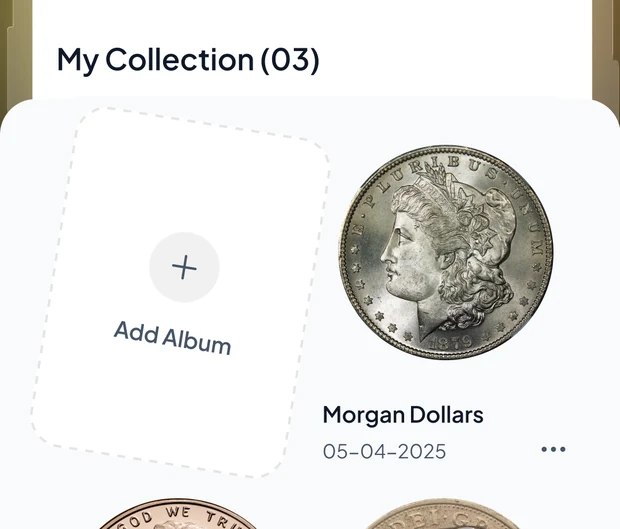
Straight from inside the app
Real screens: read the identifiers, then watch the album fill up.
Taken from the CoinBrain App Store screenshots. Coin names and figures shown are examples — values in the app depend on the coin and its condition.
What you get with CoinBrain
CoinBrain is a subscription app: the download is free, and full access comes with the subscription. Where your store offers an introductory free trial, the purchase screen shows it before you commit.
Start with the appPrice, any introductory offer and renewal terms are set by the App Store or Google Play and are shown on the purchase screen in your region before you buy. If a trial is offered it converts to a paid subscription unless you cancel beforehand, and you can cancel any time from your store subscription settings.
-
Unlimited coin scans US, world and ancient — obverse or reverse.
-
Full coin identifiers Up to ten specs per coin, not just a name.
-
Market data per coin Price, 30-day change and recent volume.
-
Collection tracker Albums and a running total for the whole collection.
-
Ad-free Nothing between you and the coin in your hand.
Questions, answered
The things collectors ask us before they download.
Find out what is in the coin jar
Free to download. Tip the jar out, photograph the first one and see what comes back.